
INFINITE EARNERS | NEW DIAMOND BLUEPRINT | LEAD LEVERAGE MACHINE | INFINITE WEALTH
FAQ's
Your support means the world to us! Here is a quick reference document to keep things easy and quick to find.
GETTING AND MANAGING LEADS
How do I refer leads to the Infinite Earners FREE Group?
YOU MUST HAVE LEAD LEVERAGE MACHINE OR INFINITE WEALTH MEMBERSHIP TO ACCESS THIS.
When someone is interested in this amazing opportunity, send them YOUR CUSTOM shareable link:
https://infiniteearners.com/join *** YOUR CUSTOM INFO MUST BE HERE**
Make sure they enter YOUR name as the referee. Once they’ve filled in their details, they’ll be directed straight to the Infinite Earners group.
This is the only link you should be sharing, as this will ensure your leads come into the Infinite Earners group and that we are capturing their details in the process.
Click here for UNLOCKING YOUR CUSTOMER REFERRAL LINK TRAINING
There is a comprehensive training in the portal with videos showing how the Lead Leverage Machine works.
REFER TO TRAINING >> HOW TO USE THE LEAD LEVERAGE MACHINE
CLICK HERE TO BUY LEAD LEVERAGE MACHINE
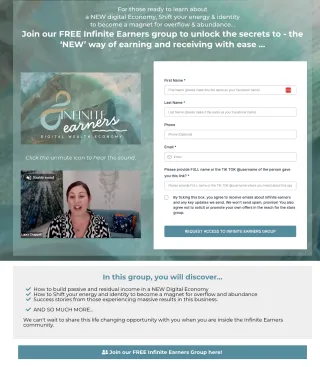
I can't access/login to Infinite Earners?
You must login to IE using the same email address you joined with. If you have more than one email address linked to IE this could be the issue. Check your emails (and in junk emails) for your initial registration message, this is the email address you need to use to login.
You can login here: https://members.diamondblueprint.net/communities/groups/infinite-earners/home
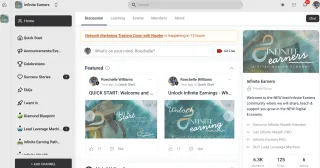
In IE some channels have a LOCK on them?
If you can see a channel with a lock icon on it, it means it means you have access - the lock indicates it's a private channel.
Whether you can post or only view it depends on your access, but the lock simply indicates it's not a public channel.
How do I find my Livegood referrer links?
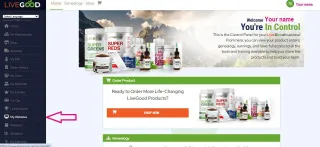
Your referral links are in "My Websites" (see screenshot) in your LiveGood back office.
IMPORTANT: the second link down is the one you use when someone would like to become an affiliate and join your team.
It will say: https://www.LiveGoodTour.com/YOURUSERNAME
Whenever anyone has pre enrolled OR signed up as a member via your link, you will get an email plus you will see them in your back office under "my referrals".
NB : They will NOT be in your Enroller Tree until the following pay day.
There is a comprehensive training in the portal with a video showing how this all works.
REFER TO TRAINING >> HOW TO SHARE YOU LIVEGOOD LINKS
Click here for How to find your Lead leverage Machine referral UNLOCKING YOUR CUSTOMER REFERRAL LINK TRAINING
How do you get your LiveGood lead to sign up after they pre enrol?
For your lead to sign up and lock in their current (pre enrolled) position in the matrix they need to pay the $40 affiliate fee and $9.95 for the first month of their membership. This needs to be done by Thursday midnight USA time, each week.
They will then be charged $9.95 per month to keep their membership active. Exactly the same as YOUR membership.
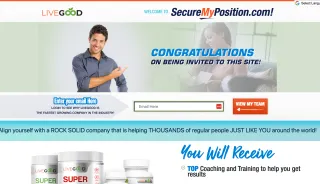
Tell them to go back to the email they got when they pre-enrolled and click on "Join Now” OR USE this link: https://www.securemyposition.com/
NB: We can ALL use the “securemyposition” link, as the lead’s email address links them to their pre enrolment.
There is a comprehensive training in the portal with a video showing how this all works.
REFER TO TRAINING >> HOW TO SHARE YOUR LIVEGOOD LINKS
Apart from Infinite Earners is there somewhere else we can refer people to to find out more?
Tell them that our Infinite Earners group is the most thorough place with information on the opportunity, answers to questions already asked, more videos on different parts of the opportunity and people who will be supporting them to make the money they desire.
Ideally they want to be in the group to learn more about the opportunity.
Be sure to use your custom LINK to invite them, so that you know who your leads are
IF YOU ARE AN INFINITE WEALTH/LEAD LEVERAGE MACHINE MEMBER - GET YOUR CUSTOM LINK IN YOUR AFFILIATE BACK OFFICE.
If the person does not want to join the group - you can send them a presentation along with the commission structure and your link. There are presentations in Boards under Presentations & Commissions.
Tell them that the method of sharing info (by just sending a video about the opportunity) the least recommended as there's no option to meet other people who have already joined and would be supporting them to make the money.
There is a comprehensive training in the portal with a video showing how this all works.
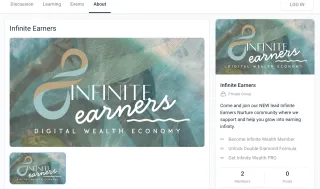
My person has said they have joined up as a Livegood affiliate but I haven’t had an email to say they have done so.
Check to see if that email has landed in your spam, and ask for a screenshot of their Affiliate Confirmation Email.
If they say they don’t have one, check “My Referrals” in your back office to see the status of their membership - if they are showing up as a pre-enrollee only, send them a screenshot of their current status and send instructions for them to sign up as an affiliate.
If they have signed up as an affiliate and you have no records of their current membership status, ask them to contact support.
If they have definitely signed up and paid, check your spam for your affiliate confirmation email, if it's not there, please contact [email protected]
There is a comprehensive training in the portal with a video showing how this all works.
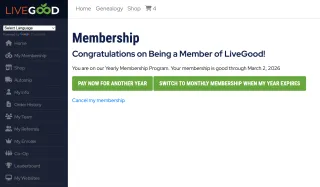
How do I know when my lead wants to join LiveGood?
There is an I WANT IN channel in the Infinite Earners community. They will be educated during the training, that when they are ready to start to go there and comment I WANT IN. You will be notified and tagged by our team when they do so.
WHAT DO I NEED TO SET UP?
What accounts should I set up if going to Diamond?
We HIGHLY recommend grabbing your top positions yourself as these are the ones that will benefit the most from you growing a team. We suggest getting your top 6 to 10 positions asap (as members at a minimum) to hold the spot, then upgrade them to affiliate later.
Every single person you enroll, then falls under your top 6 to 10 positions. In Laura’s case, her top 6 to 10 people are now earning hundreds a month passively, AND even if those spots do not grow a team they will eventually earn 2k a month.
Everyone you personally enrol falls into the matrix of the people below you and you get paid .25 cents off every person in your matrix, whether you enrol them or not. By getting those top 6 to 10 spots it will maximise your income. Remember, you will earn passively from these positions even if they sit there and without enrolling anyone.
There is a comprehensive training in the portal with a video showing how this all works.
How do I sign up my kids (they are under 18?) & / pets?
When we do this, these accounts are called “Custodian” accounts.
This video below explains how to create Custodian accounts.
Note that this explains how to set them up as an “Affiliate” not just as a “Member”.
There is a comprehensive training in the portal with a video showing how this all works.
How do I enrol my first 6-10 people?
There are several videos in the Diamond Blueprint Hub (Module 3 Basics to Bronze) course that has this outlined and the benefits of getting this set up correctly.
There is a comprehensive training in the portal with a video showing how this all works.

How do I set up my wallet for EXTRA accounts?
We have outlined some great ways to set up EXTRA bank accounts to enable you to grab these extra accounts. As you need a UNIQUE Credit Card and UNIQUE emails for each account.
We have outlined in our training how to use WISE to create these cards. There are other ways like GIFT Visa cards or transferring credit that will enable this to be achieved.
You are able to use WISE to set up as a payout account in your global ewallet with ipayout also.
There is a comprehensive training in the portal with a video showing how this all works.
What if my top positions are already taken?
We don’t want you to miss setting up your top positions as they are the ones that earn the most. Once these positions are taken either by you (or your family) OR by you starting to enroll other people, they are locked in as they are and cannot be changed.
If this happens, we still highly recommend you enroll your loved ones anyway. No matter where they end up in your matrix. They will still earn at some point.
This is why it is so important to act quickly before these spots are taken.
There is a comprehensive training in the portal with a video showing how this all works.
HOW DO I GET PAID?
How do I set up to ensure I get paid?
IMPORTANT to do asap: Go to your LiveGood back office and click My earnings > Green button "TRANSFER MY EARNINGS TO CREDIT WALLET" and ensure that you have all earnings going to your CREDIT WALLET until you have your global ewallet set up correctly. Then you can change it over.
There are several more steps to follow and these are all explained in the portal.
There is a comprehensive training in the portal with a video showing how this all works.
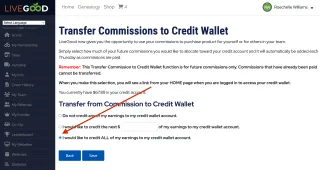
How do I activate/set up my eWallet?
You need to have earned over $25 to be sent the next steps to activate your global eWallet with ipayout.
Once you have then the next steps to input your info and activate it will appear.
You will receive an email to set up your global eWallet with ipayout.
There is a comprehensive training in the portal with a video showing how this all works.
What is the difference between the credit wallet & global e-wallet with ipayout?
Your credit wallet is what is held WITHIN the LiveGood platform. You can pay for your membership or purchase products with your credit wallet.
Your global e-wallet is with ipayout where your earnings are SENT (once you have set it up) in order for you to withdraw your earnings into your own bank account.
When you are ready, you can transfer funds to your ewallet for withdrawal to your own bank account.
There is a comprehensive training in the portal with a video showing how this all works.

How can I pay for a membership with my credit wallet
You can use your credit wallet funds to purchase a membership for an existing OR a new account.
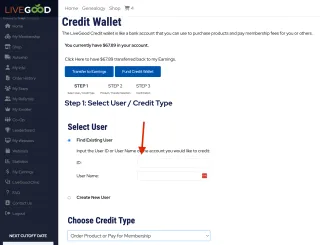
Go to MY EARNINGS > CREDIT WALLET > Select New User OR enter the ID or username and select “Order product and pay for a membership”, then follow the prompts.
There is a comprehensive training in the portal with a video showing how this all works.
Lead Leverage Machine and Infinite Wealth Q&A
HOW DO I SET UP MY NEW AFFILIATE?
Where do I send my new affiliate?
You MUST use your CUSTOMER LINK to send them the NEW Diamond Blueprint - Quick Start. This is the only link you need to share with your new affiliates gives them access to everything they need:
https://infiniteearners.com/quickstart YOUR CUSTOM ENDING
Once your new affiliate has signed up and paid their affiliate fee with Livegood:
✅ Give them them YOUR CUSTOM link to get them started on the NEW Diamond Blueprint training.
✅ You DO NOT need to give them any other links.
The training will take them through everything they need and give them the links to everything else they need as they complete the training.
Please ensure you support them throughout this process and remind them that if they move through the training, without skipping ahead they will be given access to everything.
If they DO skip ahead, they will not be able to access parts that have not yet unlocked for them.
Please note: They will be offered the Lead Leverage Machine PAID offer to use Infinite Earners as their lead converting group. If you are in INFINITE WEALTH you may receive a commission for this sale
There is a comprehensive training in the portal with a video showing how this all works.
In IW or LLM where do I find my affiliate dashboard ?
You MUST use your CUSTOMER LINK to send them the NEW Diamond Blueprint - Quick Start. This is the only link you need to share with your new affiliates gives them access to everything they need:
By moving through your training in the correct order, it will show you where to find your dashboard.
There is a comprehensive training in the portal with a video showing how this all works.
Note (this link is only accessible to those that have IW or LLM).
In IW or LLM where do I find my custom links ?
By moving through the training in the order it is delivered, it will show you where to find your links.
There is a comprehensive training in the portal with a video showing how this all works.
Note (this link is only accessible to those that have IW or LLM).
In IW or LLM where do I find my custom links from my phone ?
Your IW Links Dashboard: https://members.diamondblueprint.net/affiliate/campaign
Your IW Leads Dashboard: https://members.diamondblueprint.net/affiliate/lead
Note (these are only accessible to those that have IW or LLM).
In IW or LLM where do I find my leads in my back office ?
By moving through your training in the correct order, it will show you where to find your leads.
There is a comprehensive training in the portal with a video showing how this all works. Note (this link is only accessible to those that have IW or LLM).
There is a comprehensive training in the portal with a video showing how this all works.
Note (this link is only accessible to those that have IW or LLM).
In IW or LLM I did not get and email for my new lead ?
We suggest you don’t rely solely on receiving emails for this, and check your back office regularly. Ensure you are subscribed to receive emails from IE and have the settings turned on in your profile to receive them as well.
In IW or LLM I can't Find, TAG or message a LEAD in Infinite Earners?
To check if your lead has joined IE, check your affiliate back office. If your lead is there they have been granted access to the IE community.
To tag them, type an @ then the whole first and last name. If you are 100% sure they have joined IE, you can message the direct link to the particular training you want to tag them in. To do this, open the training on a computer, and copy the direct web link to send to them. Note they need to have access to that particular module in order to open it.
To message, click the CHAT box on your computer in the IE hub and search for their name.
There is a comprehensive training in the portal with a video showing how this all works.
Note (this link is only accessible to those that have IW or LLM).
My new affiliate can’t access the Diamond Blueprint, how do I fix this?
If your new affiliate follows the process EXACTLY as per the instructions in the QUICK START, they will receive access to everything. Note that certain milestones are unlocked by completing the previous one. They must NOT skip ahead!
When they first start, YOU only need to send them one link, which is this quick start link:
infiniteearners.net/quick-start YOUR CUSTOM LINK
By completing the training in the DB hub they will gain access to Telegram, the Diamond Blueprint FB group etc.
If they use any other links they will not gain access to Diamond Blueprint.
You, as their enroller, can check if they have used the correct process by searching their name in the Diamond Blueprint MEMBER Request thread. Meaning there will be a lead notification in THAT when they request access to DB.
There is a comprehensive training in the portal with a video showing how this all works.
How do I fix an error message when I (or someone else) is trying to sign up OR create a custodian account?
This will happen on occasion. First try logging out and closing your browser, waiting a few hours then trying again. If this doesn’t work, then send an email to [email protected]
What happens if I miss paying my membership for a month in IW?
NEVER EVER MISS A PAYMENT! If you miss paying you lose your position and cannot get it back. We recommend upgrading to paying for a year if you can, otherwise set a reminder for each month to ensure this never happens.
How do I update my card/payment details for LLM or IW?
Please email [email protected] to do this.
How do I notify if a sale happened and they did not use my custom link ?
We will update this in the system when the sale goes through. Check you back office to ensure you see it - this may take up to 48 hours.
If you do not see this please email us to notify us of this and we can check the allocation.
Please email [email protected] to do this.
How do I notify if I increase my rank in LiveGood ?
You need to send us and email and allow 30 days for this change to occur. Please check you back office and see that you have links that reflect your commission %.
Please email [email protected] to do this.
Someone messaged me in IE saying they are admin ?
It’s unlikely they are as admin will not message you directly in the hub. Please report this to the admin via the post below in the IE community, then block them.
CLICK here to find the post explaining in detail what to do.
Please email [email protected] to notify us if this occurs.
What countries cannot participate in LiveGood?
The following countries are on the list of countries that cannot do business with US-based companies. We cannot allow them to participate.
- Afghanistan
- Belarus
- Central African Republic
- Cuba
- Democratic Republic of the Congo
- Ethiopia
- Iran
- Iraq
- Lebanon
- Libya
- Mali
- Myanmar
- Nicaragua
- North Korea
- Palestinian Territory
- Russia
- Somalia
- South Sudan
- Sudan
- Syria
- Yemen
- Zimbabwe
In IW or LLM - I can't find an answer listed here and I have done the training?
The tech support happens in our Telegram channel (which is unlocked in the training). Before asking in that channel please complete your entire training/s. If you are unable to find the answer you can ask in the Telegram channel.
Note: this Telegram tech support channel is for tech issues only, general questions go to your referrer first.
Once you rank Silver, Gold, or Platinum, you'll also unlock rank-specific support channels too.
WANT TO KNOW MORE ABOUT THE COMPENSATION PLAN?
I don’t really understand the compensation plan!
I need help understanding the compensation plan. These videos explains how it works:
https://youtu.be/dCIkRzVrW4U?si=XTNEYE4TZbMQYlGc
https://youtu.be/nzxnkTt3b0E?si=U8pvxVHuXnW_Wfo4
There is a comprehensive training in the portal with a video showing how this all works.
How does spillover work?
Spillover explained. This video explains it!
https://youtu.be/Q8yFdEbndPw?si=mpzP_hFQzJBIrvNj
There is a comprehensive training in the portal with a video showing how this all works.
Can you earn from a forced matrix?
Can I earn from a forced matrix? This video explains it!
https://youtu.be/l6sDcQkp6vM?si=Oo0NhqqK2pQB-Dum
There is a comprehensive training in the portal with a video showing how this all works.
What does the subscription economy mean?
What does the term “subscription economy” mean?
There is a comprehensive training in the portal with a video showing how this all works.